> ## Documentation Index
> Fetch the complete documentation index at: https://docs-dev-fix-docs-5547-passwordless-db-update.mintlify.site/llms.txt
> Use this file to discover all available pages before exploring further.

> Configure an update policy form using Forms for Actions

# Use Cases: Configure an update policy form using Forms

<Card title="Before you start">
  1. Create a [Machine-to-Machine Application](/docs/get-started/auth0-overview/create-applications/machine-to-machine-apps) with the following scopes enabled:

  * `read:users`
  * `update:users`
  * `create:users`
  * `read:users_app_metadata`
  * `update:users_app_metadata`
  * `create:users_app_metadata`

  2. Add a [Vault connection](/docs/customize/forms/vault) using the M2M application credentials.
</Card>

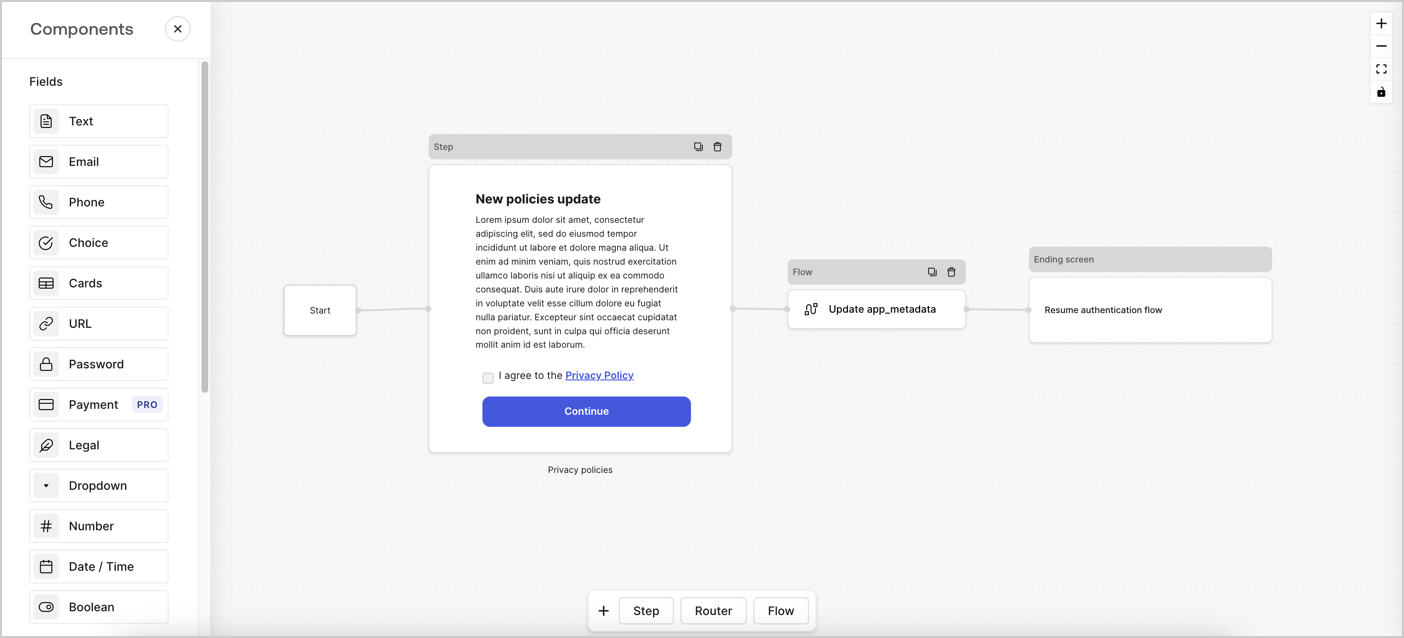
Forms for Actions allows you to create custom privacy policies flows and store the consent under the `app_metadata` object.
<Frame>
  <img src="https://mintcdn.com/docs-dev-fix-docs-5547-passwordless-db-update/Lfu7vN1oaL2INCAz/docs/images/cdy7uua7fh8z/6i68dMvHDTijfRmSgN1x8Q/ad900e7d4c0fb34645921435472b8684/privavy-policy-form.png?fit=max&auto=format&n=Lfu7vN1oaL2INCAz&q=85&s=f94e73c66b4689791c9e1fe006b618a6" alt="Dashboard > Actions > Forms > Privacy policy use case" data-og-width="1404" width="1404" data-og-height="638" height="638" data-path="docs/images/cdy7uua7fh8z/6i68dMvHDTijfRmSgN1x8Q/ad900e7d4c0fb34645921435472b8684/privavy-policy-form.png" data-optimize="true" data-opv="3" srcset="https://mintcdn.com/docs-dev-fix-docs-5547-passwordless-db-update/Lfu7vN1oaL2INCAz/docs/images/cdy7uua7fh8z/6i68dMvHDTijfRmSgN1x8Q/ad900e7d4c0fb34645921435472b8684/privavy-policy-form.png?w=280&fit=max&auto=format&n=Lfu7vN1oaL2INCAz&q=85&s=2713c0e7919568b02fb9326ade831b0e 280w, https://mintcdn.com/docs-dev-fix-docs-5547-passwordless-db-update/Lfu7vN1oaL2INCAz/docs/images/cdy7uua7fh8z/6i68dMvHDTijfRmSgN1x8Q/ad900e7d4c0fb34645921435472b8684/privavy-policy-form.png?w=560&fit=max&auto=format&n=Lfu7vN1oaL2INCAz&q=85&s=582755c7c6af3e09e44a28bf0f3560ae 560w, https://mintcdn.com/docs-dev-fix-docs-5547-passwordless-db-update/Lfu7vN1oaL2INCAz/docs/images/cdy7uua7fh8z/6i68dMvHDTijfRmSgN1x8Q/ad900e7d4c0fb34645921435472b8684/privavy-policy-form.png?w=840&fit=max&auto=format&n=Lfu7vN1oaL2INCAz&q=85&s=8d2db7852e7da9daf3844e258eff0936 840w, https://mintcdn.com/docs-dev-fix-docs-5547-passwordless-db-update/Lfu7vN1oaL2INCAz/docs/images/cdy7uua7fh8z/6i68dMvHDTijfRmSgN1x8Q/ad900e7d4c0fb34645921435472b8684/privavy-policy-form.png?w=1100&fit=max&auto=format&n=Lfu7vN1oaL2INCAz&q=85&s=67dcf438fd6e17cb0cacbed44f2867d2 1100w, https://mintcdn.com/docs-dev-fix-docs-5547-passwordless-db-update/Lfu7vN1oaL2INCAz/docs/images/cdy7uua7fh8z/6i68dMvHDTijfRmSgN1x8Q/ad900e7d4c0fb34645921435472b8684/privavy-policy-form.png?w=1650&fit=max&auto=format&n=Lfu7vN1oaL2INCAz&q=85&s=23d327b094f5f90d43893ed7bd99dcc5 1650w, https://mintcdn.com/docs-dev-fix-docs-5547-passwordless-db-update/Lfu7vN1oaL2INCAz/docs/images/cdy7uua7fh8z/6i68dMvHDTijfRmSgN1x8Q/ad900e7d4c0fb34645921435472b8684/privavy-policy-form.png?w=2500&fit=max&auto=format&n=Lfu7vN1oaL2INCAz&q=85&s=fafe8c388b477d681f1bc7478239feed 2500w" />
</Frame>

The sections below outline how you can create an Update Policy form using nodes and flows, along with steps for adding your form to a [Post Login](/docs/customize/actions/explore-triggers/signup-and-login-triggers/login-trigger) Action.

## Create a form from scratch

Follow these steps to create a form to gather information:

1. Open the Form editor by selecting **Auth0 Dashboard > Actions > Forms.**
2. Select **Create Form** > **Start from scratch**.

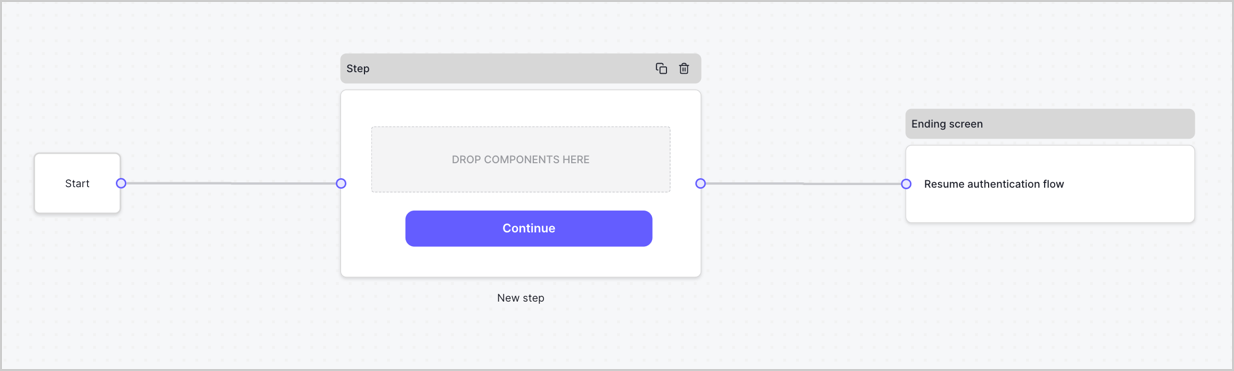
By default, a new form contains a Start node, a Step node, and an Ending screen node.
<Frame>
  <img src="https://mintcdn.com/docs-dev-fix-docs-5547-passwordless-db-update/PVS4YYaDfznGvCp4/docs/images/cdy7uua7fh8z/2TZ9jSjgEcARFpULI6hz4R/a4319a1bd482f2ee5cc23100fdb2f42c/New-form-Forms-for-action-use-case.png?fit=max&auto=format&n=PVS4YYaDfznGvCp4&q=85&s=a065c9d9f10e43946e47f0b92584822b" alt="Dashboard > Forms > Use Cases > Form" data-og-width="1234" width="1234" data-og-height="371" height="371" data-path="docs/images/cdy7uua7fh8z/2TZ9jSjgEcARFpULI6hz4R/a4319a1bd482f2ee5cc23100fdb2f42c/New-form-Forms-for-action-use-case.png" data-optimize="true" data-opv="3" srcset="https://mintcdn.com/docs-dev-fix-docs-5547-passwordless-db-update/PVS4YYaDfznGvCp4/docs/images/cdy7uua7fh8z/2TZ9jSjgEcARFpULI6hz4R/a4319a1bd482f2ee5cc23100fdb2f42c/New-form-Forms-for-action-use-case.png?w=280&fit=max&auto=format&n=PVS4YYaDfznGvCp4&q=85&s=5edef8562d0a64d72aceb9dc89688a91 280w, https://mintcdn.com/docs-dev-fix-docs-5547-passwordless-db-update/PVS4YYaDfznGvCp4/docs/images/cdy7uua7fh8z/2TZ9jSjgEcARFpULI6hz4R/a4319a1bd482f2ee5cc23100fdb2f42c/New-form-Forms-for-action-use-case.png?w=560&fit=max&auto=format&n=PVS4YYaDfznGvCp4&q=85&s=e4fac777a2f06a32769d44fcf0f4d638 560w, https://mintcdn.com/docs-dev-fix-docs-5547-passwordless-db-update/PVS4YYaDfznGvCp4/docs/images/cdy7uua7fh8z/2TZ9jSjgEcARFpULI6hz4R/a4319a1bd482f2ee5cc23100fdb2f42c/New-form-Forms-for-action-use-case.png?w=840&fit=max&auto=format&n=PVS4YYaDfznGvCp4&q=85&s=5dbcc3f048fc41a3f1e4b91e9f3ca53f 840w, https://mintcdn.com/docs-dev-fix-docs-5547-passwordless-db-update/PVS4YYaDfznGvCp4/docs/images/cdy7uua7fh8z/2TZ9jSjgEcARFpULI6hz4R/a4319a1bd482f2ee5cc23100fdb2f42c/New-form-Forms-for-action-use-case.png?w=1100&fit=max&auto=format&n=PVS4YYaDfznGvCp4&q=85&s=d059fcf91809a6307d9b55cd2a435252 1100w, https://mintcdn.com/docs-dev-fix-docs-5547-passwordless-db-update/PVS4YYaDfznGvCp4/docs/images/cdy7uua7fh8z/2TZ9jSjgEcARFpULI6hz4R/a4319a1bd482f2ee5cc23100fdb2f42c/New-form-Forms-for-action-use-case.png?w=1650&fit=max&auto=format&n=PVS4YYaDfznGvCp4&q=85&s=cbcbf670424b28894fcc57d42c7aada1 1650w, https://mintcdn.com/docs-dev-fix-docs-5547-passwordless-db-update/PVS4YYaDfznGvCp4/docs/images/cdy7uua7fh8z/2TZ9jSjgEcARFpULI6hz4R/a4319a1bd482f2ee5cc23100fdb2f42c/New-form-Forms-for-action-use-case.png?w=2500&fit=max&auto=format&n=PVS4YYaDfznGvCp4&q=85&s=9872efc688696c922ec9a6bb69c6890e 2500w" />
</Frame>

### Configure the Step node

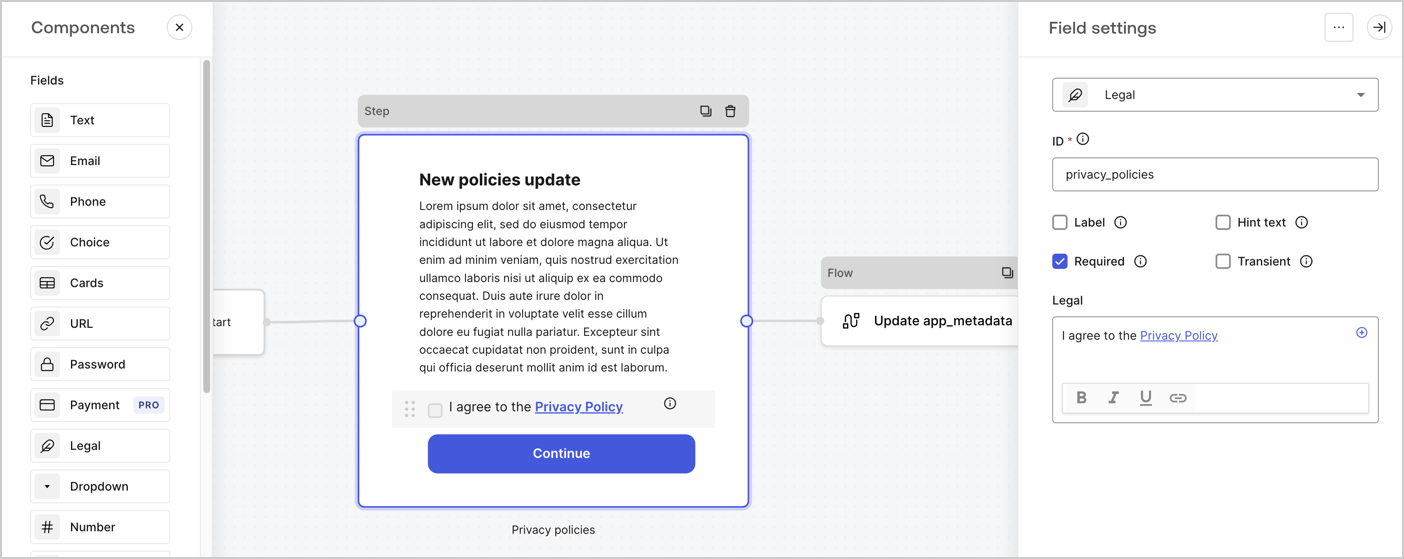
The Step node is the graphical interface visible to users. Add [Fields](/docs/customize/forms/nodes-and-components) to the Step node to collect the new agreement acceptance value by following these steps:

1. Drag a **Rich text** field from the **Components menu** into the **Step** node.

   * **Rich text**: Enter a description of your privacy policies updates.
   * Select **Save**.
2. Drag a **Legal** field into the **Step** node.

   * **ID**: Enter `privacy_policies`.
   * **Required**: Enable the checkbox.
   * **Legal**: Enter `I agree to the Privacy Policy`.
   * Select **Save**.
3. Select **Publish** to save.
<Frame>
  <img src="https://mintcdn.com/docs-dev-fix-docs-5547-passwordless-db-update/LGFE5GZUSti0B09h/docs/images/cdy7uua7fh8z/59zFFjQjAnjogkc2QGIqqJ/0ad66b1b636544122aa4e65968b76c2c/privacy-policy-step-node.png?fit=max&auto=format&n=LGFE5GZUSti0B09h&q=85&s=8e79920b0e550fd292685e0032966d5c" alt="Dashboard > Actions > Forms > Use case privacy policy step node" data-og-width="1404" width="1404" data-og-height="559" height="559" data-path="docs/images/cdy7uua7fh8z/59zFFjQjAnjogkc2QGIqqJ/0ad66b1b636544122aa4e65968b76c2c/privacy-policy-step-node.png" data-optimize="true" data-opv="3" srcset="https://mintcdn.com/docs-dev-fix-docs-5547-passwordless-db-update/LGFE5GZUSti0B09h/docs/images/cdy7uua7fh8z/59zFFjQjAnjogkc2QGIqqJ/0ad66b1b636544122aa4e65968b76c2c/privacy-policy-step-node.png?w=280&fit=max&auto=format&n=LGFE5GZUSti0B09h&q=85&s=e558810b0c25702cdf91b802898b84bc 280w, https://mintcdn.com/docs-dev-fix-docs-5547-passwordless-db-update/LGFE5GZUSti0B09h/docs/images/cdy7uua7fh8z/59zFFjQjAnjogkc2QGIqqJ/0ad66b1b636544122aa4e65968b76c2c/privacy-policy-step-node.png?w=560&fit=max&auto=format&n=LGFE5GZUSti0B09h&q=85&s=9e623b22631f7a040d7a75f28dcba89a 560w, https://mintcdn.com/docs-dev-fix-docs-5547-passwordless-db-update/LGFE5GZUSti0B09h/docs/images/cdy7uua7fh8z/59zFFjQjAnjogkc2QGIqqJ/0ad66b1b636544122aa4e65968b76c2c/privacy-policy-step-node.png?w=840&fit=max&auto=format&n=LGFE5GZUSti0B09h&q=85&s=50c93a297937444a95e0766556ecd9c0 840w, https://mintcdn.com/docs-dev-fix-docs-5547-passwordless-db-update/LGFE5GZUSti0B09h/docs/images/cdy7uua7fh8z/59zFFjQjAnjogkc2QGIqqJ/0ad66b1b636544122aa4e65968b76c2c/privacy-policy-step-node.png?w=1100&fit=max&auto=format&n=LGFE5GZUSti0B09h&q=85&s=64b076d7418e8104228ea36d6011209b 1100w, https://mintcdn.com/docs-dev-fix-docs-5547-passwordless-db-update/LGFE5GZUSti0B09h/docs/images/cdy7uua7fh8z/59zFFjQjAnjogkc2QGIqqJ/0ad66b1b636544122aa4e65968b76c2c/privacy-policy-step-node.png?w=1650&fit=max&auto=format&n=LGFE5GZUSti0B09h&q=85&s=c229b1f89228536e0404c80e0cd945fd 1650w, https://mintcdn.com/docs-dev-fix-docs-5547-passwordless-db-update/LGFE5GZUSti0B09h/docs/images/cdy7uua7fh8z/59zFFjQjAnjogkc2QGIqqJ/0ad66b1b636544122aa4e65968b76c2c/privacy-policy-step-node.png?w=2500&fit=max&auto=format&n=LGFE5GZUSti0B09h&q=85&s=14de41eea53c9e6144660bf72e2acd65 2500w" />
</Frame>

### Configure the Flow node

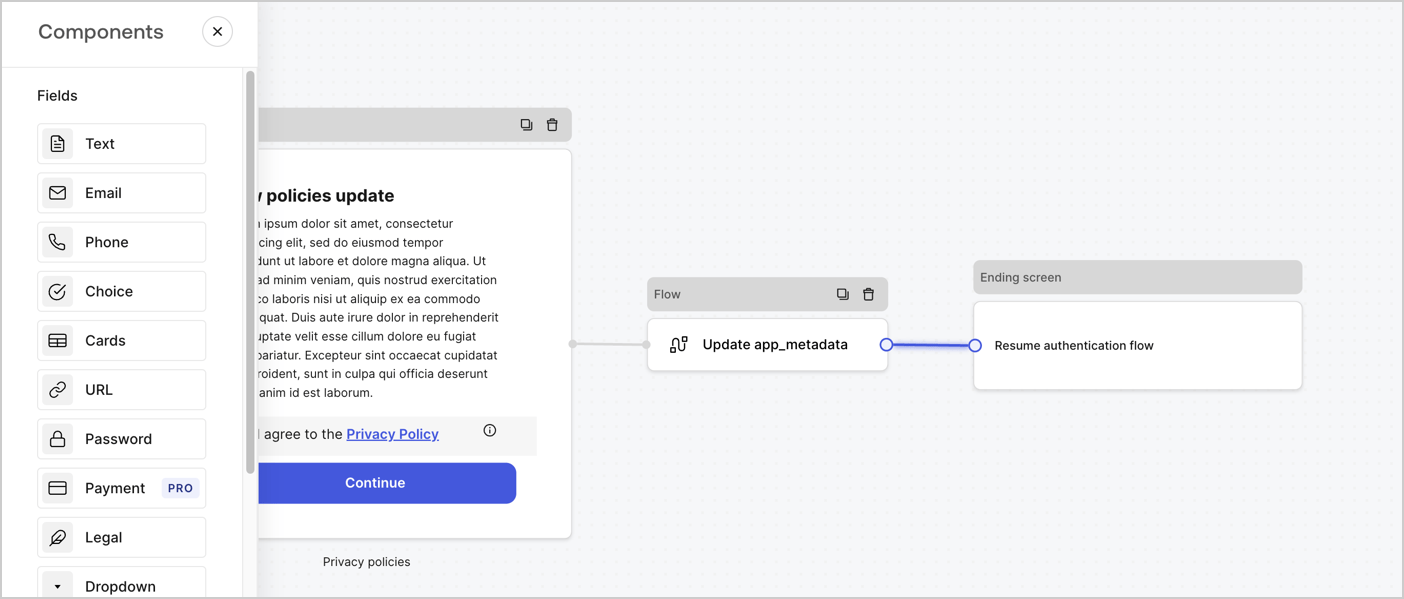
Add a **Flow** node after the **Step** node to update the `app_metadata` and resume the authentication flow by following these steps:

1. Select **Flow** from the bottom of the Form editor.
2. Remove the existing link between the **Step** and **Ending Screen** nodes.
3. Select the new **Flow** > **Click to add a flow** > **Create a new flow.**

   * Enter `Update app_metadata` in the **Name** field.
   * Select **Create**.
   * Select **Save**.
4. Link the **Flow** node to the **Step** and **Ending Screen** nodes as pictured below.
5. Select **Publish** to save.
<Frame>
  <img src="https://mintcdn.com/docs-dev-fix-docs-5547-passwordless-db-update/Lfu7vN1oaL2INCAz/docs/images/cdy7uua7fh8z/6YIkzm7SrpM9LW76AXuRzh/353c518fe82bbaa440836da1d83596d6/link-policies.png?fit=max&auto=format&n=Lfu7vN1oaL2INCAz&q=85&s=df70e62a8627b9da95f723b4f4402f12" alt="Dashboard > Actions > Forms > Form" data-og-width="1404" width="1404" data-og-height="599" height="599" data-path="docs/images/cdy7uua7fh8z/6YIkzm7SrpM9LW76AXuRzh/353c518fe82bbaa440836da1d83596d6/link-policies.png" data-optimize="true" data-opv="3" srcset="https://mintcdn.com/docs-dev-fix-docs-5547-passwordless-db-update/Lfu7vN1oaL2INCAz/docs/images/cdy7uua7fh8z/6YIkzm7SrpM9LW76AXuRzh/353c518fe82bbaa440836da1d83596d6/link-policies.png?w=280&fit=max&auto=format&n=Lfu7vN1oaL2INCAz&q=85&s=8db9a22acd77dbc4b2101f04b5a2b0e4 280w, https://mintcdn.com/docs-dev-fix-docs-5547-passwordless-db-update/Lfu7vN1oaL2INCAz/docs/images/cdy7uua7fh8z/6YIkzm7SrpM9LW76AXuRzh/353c518fe82bbaa440836da1d83596d6/link-policies.png?w=560&fit=max&auto=format&n=Lfu7vN1oaL2INCAz&q=85&s=38e4223916dc30c2a5f49de93d8fc9a6 560w, https://mintcdn.com/docs-dev-fix-docs-5547-passwordless-db-update/Lfu7vN1oaL2INCAz/docs/images/cdy7uua7fh8z/6YIkzm7SrpM9LW76AXuRzh/353c518fe82bbaa440836da1d83596d6/link-policies.png?w=840&fit=max&auto=format&n=Lfu7vN1oaL2INCAz&q=85&s=2cd320daea66c812c489661743021e19 840w, https://mintcdn.com/docs-dev-fix-docs-5547-passwordless-db-update/Lfu7vN1oaL2INCAz/docs/images/cdy7uua7fh8z/6YIkzm7SrpM9LW76AXuRzh/353c518fe82bbaa440836da1d83596d6/link-policies.png?w=1100&fit=max&auto=format&n=Lfu7vN1oaL2INCAz&q=85&s=df17f565f3234515d6357f0a2489da34 1100w, https://mintcdn.com/docs-dev-fix-docs-5547-passwordless-db-update/Lfu7vN1oaL2INCAz/docs/images/cdy7uua7fh8z/6YIkzm7SrpM9LW76AXuRzh/353c518fe82bbaa440836da1d83596d6/link-policies.png?w=1650&fit=max&auto=format&n=Lfu7vN1oaL2INCAz&q=85&s=f84d06e4707ab1f1dd055e9795129e4f 1650w, https://mintcdn.com/docs-dev-fix-docs-5547-passwordless-db-update/Lfu7vN1oaL2INCAz/docs/images/cdy7uua7fh8z/6YIkzm7SrpM9LW76AXuRzh/353c518fe82bbaa440836da1d83596d6/link-policies.png?w=2500&fit=max&auto=format&n=Lfu7vN1oaL2INCAz&q=85&s=708ba8d1ef8851b38450e2bd8be39845 2500w" />
</Frame>

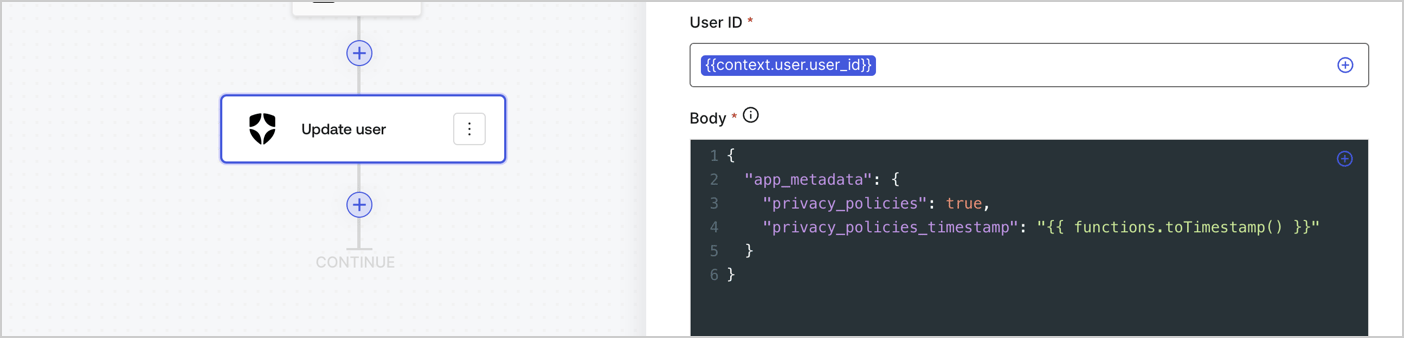
Add an Auth0 Update user action to the flow by following these steps:

1. Select the **Flow** **Update app\_metadata** > **Edit flow** to open the Flow editor in a new tab.
2. Below the StartAction, select the **+** icon to add an **Update user** action. Complete the fields below, then select **Save** to continue.

   * **Connection**: Select from the dropdown the Vault connection to your M2M application.

   * **User ID**: Enter `{{context.user.user_id}}`.

   * **Body**: Copy and paste the following code to update the app\_metadata with the privacy\_policies and privacy\_policies\_timestamp properties.

     ```text lines theme={null}
     {
       "app_metadata": {
         "privacy_policies": true,
         "privacy_policies_timestamp": "{{ functions.toTimestamp() }}"
       }
     }
     ```

   * Select **Save**.
3. Select **Publish** to save.
<Frame>
  <img src="https://mintcdn.com/docs-dev-fix-docs-5547-passwordless-db-update/ysdmpWr7uaNF6QTq/docs/images/cdy7uua7fh8z/CvMNIwWrOUwaFW4X3G28p/1fb70ae57a20749d9ffaaba8dc0b7e26/update-user-privacy.png?fit=max&auto=format&n=ysdmpWr7uaNF6QTq&q=85&s=933956e33ed6b4cf8c44f4670fcd2156" alt="Dashboard > Actions > Forms > User case privacy policy code" data-og-width="1404" width="1404" data-og-height="338" height="338" data-path="docs/images/cdy7uua7fh8z/CvMNIwWrOUwaFW4X3G28p/1fb70ae57a20749d9ffaaba8dc0b7e26/update-user-privacy.png" data-optimize="true" data-opv="3" srcset="https://mintcdn.com/docs-dev-fix-docs-5547-passwordless-db-update/ysdmpWr7uaNF6QTq/docs/images/cdy7uua7fh8z/CvMNIwWrOUwaFW4X3G28p/1fb70ae57a20749d9ffaaba8dc0b7e26/update-user-privacy.png?w=280&fit=max&auto=format&n=ysdmpWr7uaNF6QTq&q=85&s=85005e020b5099f39c10af2b931ca29f 280w, https://mintcdn.com/docs-dev-fix-docs-5547-passwordless-db-update/ysdmpWr7uaNF6QTq/docs/images/cdy7uua7fh8z/CvMNIwWrOUwaFW4X3G28p/1fb70ae57a20749d9ffaaba8dc0b7e26/update-user-privacy.png?w=560&fit=max&auto=format&n=ysdmpWr7uaNF6QTq&q=85&s=f47fdf1d4295def1991d20729105227a 560w, https://mintcdn.com/docs-dev-fix-docs-5547-passwordless-db-update/ysdmpWr7uaNF6QTq/docs/images/cdy7uua7fh8z/CvMNIwWrOUwaFW4X3G28p/1fb70ae57a20749d9ffaaba8dc0b7e26/update-user-privacy.png?w=840&fit=max&auto=format&n=ysdmpWr7uaNF6QTq&q=85&s=78d3bc69a22e3b1072680ce0c0aee845 840w, https://mintcdn.com/docs-dev-fix-docs-5547-passwordless-db-update/ysdmpWr7uaNF6QTq/docs/images/cdy7uua7fh8z/CvMNIwWrOUwaFW4X3G28p/1fb70ae57a20749d9ffaaba8dc0b7e26/update-user-privacy.png?w=1100&fit=max&auto=format&n=ysdmpWr7uaNF6QTq&q=85&s=7cf005711eb832f2114f864f0efe218c 1100w, https://mintcdn.com/docs-dev-fix-docs-5547-passwordless-db-update/ysdmpWr7uaNF6QTq/docs/images/cdy7uua7fh8z/CvMNIwWrOUwaFW4X3G28p/1fb70ae57a20749d9ffaaba8dc0b7e26/update-user-privacy.png?w=1650&fit=max&auto=format&n=ysdmpWr7uaNF6QTq&q=85&s=d7da237e5fd06c1eb604d2978673719e 1650w, https://mintcdn.com/docs-dev-fix-docs-5547-passwordless-db-update/ysdmpWr7uaNF6QTq/docs/images/cdy7uua7fh8z/CvMNIwWrOUwaFW4X3G28p/1fb70ae57a20749d9ffaaba8dc0b7e26/update-user-privacy.png?w=2500&fit=max&auto=format&n=ysdmpWr7uaNF6QTq&q=85&s=be8a1e5b595e4c7b6cc403eb188b906a 2500w" />
</Frame>

<Callout icon="file-lines" color="#0EA5E9" iconType="regular">
  The flow **Update app\_metadata** adds a `privacy_policies true` value to the app`_metadata` object and also generates a timestamp with a [helper function.](/docs/customize/forms/variables)
</Callout>

## Retrieve the form render code

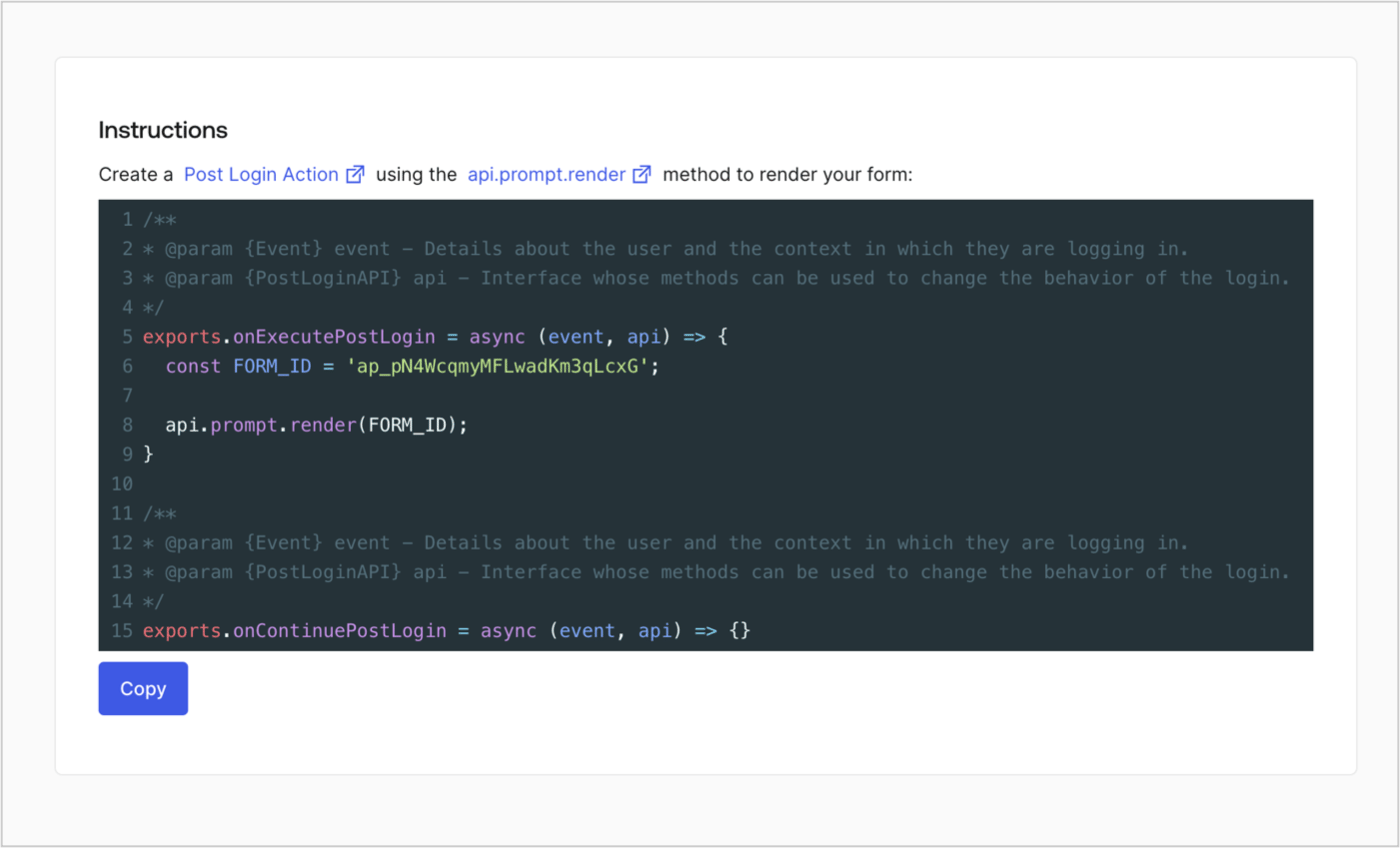
Retrieve your form render code to visually render the form with a custom Post Login Action by following these steps:

* From the Form editor, select **`<> Render`**.
* Select **Copy**.
<Frame>
  <img src="https://mintcdn.com/docs-dev-fix-docs-5547-passwordless-db-update/RI5PzOB_XKDAkIrK/docs/images/cdy7uua7fh8z/2EIUzc539sq9lwoTKbjoJv/496a864c0fc44a782c9cadca119dbfb0/embed.png?fit=max&auto=format&n=RI5PzOB_XKDAkIrK&q=85&s=d089bf95e3a39ff6e95428b919bfedc1" alt="Dashboard > Actions > Forms > Form > Embed" data-og-width="1400" width="1400" data-og-height="848" height="848" data-path="docs/images/cdy7uua7fh8z/2EIUzc539sq9lwoTKbjoJv/496a864c0fc44a782c9cadca119dbfb0/embed.png" data-optimize="true" data-opv="3" srcset="https://mintcdn.com/docs-dev-fix-docs-5547-passwordless-db-update/RI5PzOB_XKDAkIrK/docs/images/cdy7uua7fh8z/2EIUzc539sq9lwoTKbjoJv/496a864c0fc44a782c9cadca119dbfb0/embed.png?w=280&fit=max&auto=format&n=RI5PzOB_XKDAkIrK&q=85&s=b1e054a1312f4bed580c17956e43fa4f 280w, https://mintcdn.com/docs-dev-fix-docs-5547-passwordless-db-update/RI5PzOB_XKDAkIrK/docs/images/cdy7uua7fh8z/2EIUzc539sq9lwoTKbjoJv/496a864c0fc44a782c9cadca119dbfb0/embed.png?w=560&fit=max&auto=format&n=RI5PzOB_XKDAkIrK&q=85&s=2a5de5f3e4f1da0145d89bdeb189757d 560w, https://mintcdn.com/docs-dev-fix-docs-5547-passwordless-db-update/RI5PzOB_XKDAkIrK/docs/images/cdy7uua7fh8z/2EIUzc539sq9lwoTKbjoJv/496a864c0fc44a782c9cadca119dbfb0/embed.png?w=840&fit=max&auto=format&n=RI5PzOB_XKDAkIrK&q=85&s=6e1582a46ad374d8583c32a1f1b16d24 840w, https://mintcdn.com/docs-dev-fix-docs-5547-passwordless-db-update/RI5PzOB_XKDAkIrK/docs/images/cdy7uua7fh8z/2EIUzc539sq9lwoTKbjoJv/496a864c0fc44a782c9cadca119dbfb0/embed.png?w=1100&fit=max&auto=format&n=RI5PzOB_XKDAkIrK&q=85&s=69321743960b934240c8641bded7005e 1100w, https://mintcdn.com/docs-dev-fix-docs-5547-passwordless-db-update/RI5PzOB_XKDAkIrK/docs/images/cdy7uua7fh8z/2EIUzc539sq9lwoTKbjoJv/496a864c0fc44a782c9cadca119dbfb0/embed.png?w=1650&fit=max&auto=format&n=RI5PzOB_XKDAkIrK&q=85&s=d7c663b66fc94456691a30b8588a433a 1650w, https://mintcdn.com/docs-dev-fix-docs-5547-passwordless-db-update/RI5PzOB_XKDAkIrK/docs/images/cdy7uua7fh8z/2EIUzc539sq9lwoTKbjoJv/496a864c0fc44a782c9cadca119dbfb0/embed.png?w=2500&fit=max&auto=format&n=RI5PzOB_XKDAkIrK&q=85&s=dcb70e60a005abe723346c5a62aab2d3 2500w" />
</Frame>

## Create a Post Login Action

Create a post-login Action to render your form by following these steps:

1. Navigate to **Auth0 Dashboard > Actions > Flows > Login.**
2. Select the **+** icon and Select **Build from scratch**:

   * **Name**: Enter `Render Update Policy Form`.
   * **Trigger**: Select `Login / Post Login`.
   * **Runtime**: Select the recommended version.
3. Select **Create**.

To configure the post-login Action:

1. Delete the existing code from the Code editor.
2. Paste the form render code into the Code editor.
3. Edit the code to define the conditional logic that will render the form.

   ```javascript lines theme={null}
   /**
   * @param {Event} event - Details about the user and the context in which they are logging in.
   * @param {PostLoginAPI} api - Interface whose methods can be used to change the behavior of the login.
   */
   exports.onExecutePostLogin = async (event, api) => {
     const FORM_ID = 'REPLACE_WITH_YOUR_FORM_ID';

     if (event.user.app_metadata.privacy_policies !== true) {
       api.prompt.render(FORM_ID);
     }
   }

   exports.onContinuePostLogin = async (event, api) => { }
   ```

   <Callout icon="file-lines" color="#0EA5E9" iconType="regular">
     The example code above will render the form when a user is missing the app metadata `privacy_policies` property.
   </Callout>
4. Select **Deploy.**
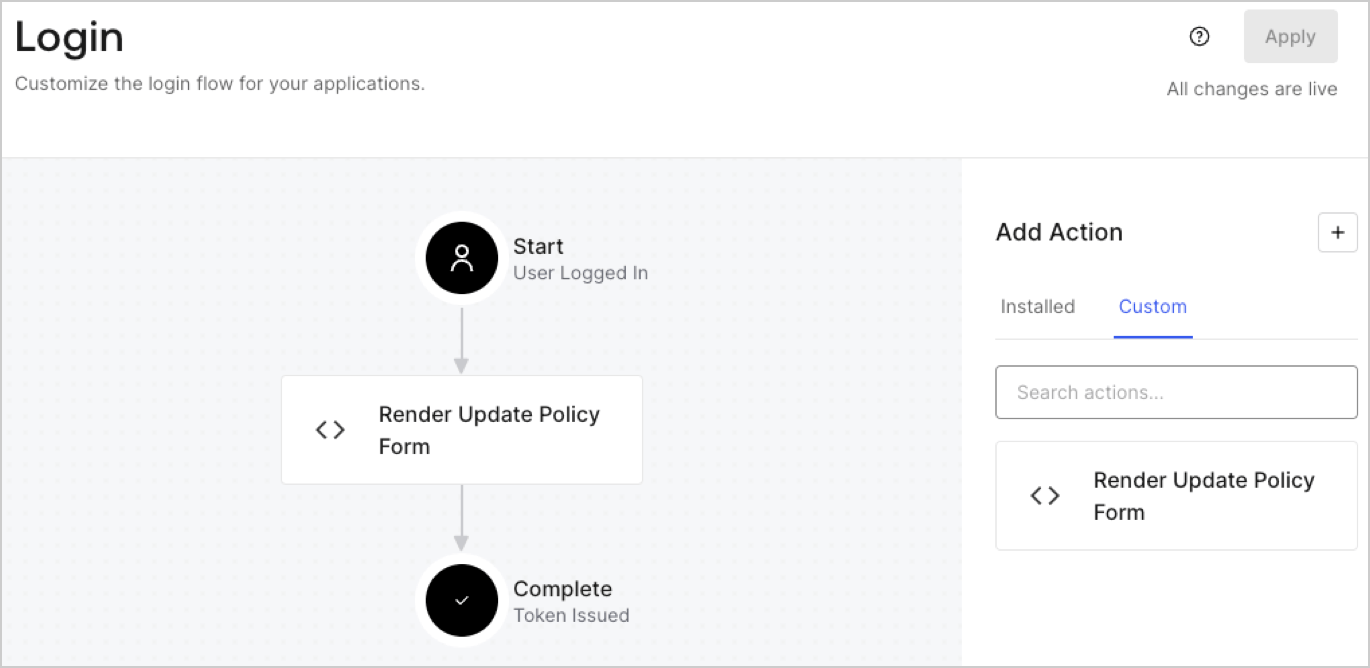
5. Drag and Drop the **Render Update Policy Form** Action to the **Login** flow.
   <Frame>
     <img src="https://mintcdn.com/docs-dev-fix-docs-5547-passwordless-db-update/SRedKsF8LPj4Uf7S/docs/images/cdy7uua7fh8z/5TOwDgevZsBqd7yZynUYWU/41ca909dc3007aed4f40ff794a05efa5/postlogin.png?fit=max&auto=format&n=SRedKsF8LPj4Uf7S&q=85&s=b92f21346e9e639a7b328af183dbfc08" alt="Dashboard > Forms > Use Case > Render update policy form login action" data-og-width="1370" width="1370" data-og-height="668" height="668" data-path="docs/images/cdy7uua7fh8z/5TOwDgevZsBqd7yZynUYWU/41ca909dc3007aed4f40ff794a05efa5/postlogin.png" data-optimize="true" data-opv="3" srcset="https://mintcdn.com/docs-dev-fix-docs-5547-passwordless-db-update/SRedKsF8LPj4Uf7S/docs/images/cdy7uua7fh8z/5TOwDgevZsBqd7yZynUYWU/41ca909dc3007aed4f40ff794a05efa5/postlogin.png?w=280&fit=max&auto=format&n=SRedKsF8LPj4Uf7S&q=85&s=c99694c9e3192c9cfb554015aaa16fff 280w, https://mintcdn.com/docs-dev-fix-docs-5547-passwordless-db-update/SRedKsF8LPj4Uf7S/docs/images/cdy7uua7fh8z/5TOwDgevZsBqd7yZynUYWU/41ca909dc3007aed4f40ff794a05efa5/postlogin.png?w=560&fit=max&auto=format&n=SRedKsF8LPj4Uf7S&q=85&s=794a149ea070fc42867435535447a358 560w, https://mintcdn.com/docs-dev-fix-docs-5547-passwordless-db-update/SRedKsF8LPj4Uf7S/docs/images/cdy7uua7fh8z/5TOwDgevZsBqd7yZynUYWU/41ca909dc3007aed4f40ff794a05efa5/postlogin.png?w=840&fit=max&auto=format&n=SRedKsF8LPj4Uf7S&q=85&s=81e45f9a73166eff0d5076101e38f252 840w, https://mintcdn.com/docs-dev-fix-docs-5547-passwordless-db-update/SRedKsF8LPj4Uf7S/docs/images/cdy7uua7fh8z/5TOwDgevZsBqd7yZynUYWU/41ca909dc3007aed4f40ff794a05efa5/postlogin.png?w=1100&fit=max&auto=format&n=SRedKsF8LPj4Uf7S&q=85&s=22c01e5a6ecf1aa663831f172d0f9a6a 1100w, https://mintcdn.com/docs-dev-fix-docs-5547-passwordless-db-update/SRedKsF8LPj4Uf7S/docs/images/cdy7uua7fh8z/5TOwDgevZsBqd7yZynUYWU/41ca909dc3007aed4f40ff794a05efa5/postlogin.png?w=1650&fit=max&auto=format&n=SRedKsF8LPj4Uf7S&q=85&s=c595f4aac2b2f8b26f65349bcf59c683 1650w, https://mintcdn.com/docs-dev-fix-docs-5547-passwordless-db-update/SRedKsF8LPj4Uf7S/docs/images/cdy7uua7fh8z/5TOwDgevZsBqd7yZynUYWU/41ca909dc3007aed4f40ff794a05efa5/postlogin.png?w=2500&fit=max&auto=format&n=SRedKsF8LPj4Uf7S&q=85&s=37815db3a01d39f88f368ff8f9b685f1 2500w" />
   </Frame>
6. Select **Apply.**

### Test implementation

Test the implementation by following these steps:

1. Log in with an existing user whose app`_metadata` attribute `privacy_policies` does not have a value.
2. The post-login Action in the Login flow will render the form and prompt for acceptance.
3. Select **Auth0 Dashboard > User Management > Users,** locate the user and verify that the `app_metadata` attribute `privacy_policies` contains a `true` value and a timestamp.
