> ## Documentation Index
> Fetch the complete documentation index at: https://docs-dev-fix-docs-5547-passwordless-db-update.mintlify.site/llms.txt
> Use this file to discover all available pages before exploring further.

> Learn how to configure a progressive profile form using Forms for Actions

# Use Cases: Configure a progressive profile form using Forms

<Card title="Before you start">
  1. Create a [Machine-to-Machine Application](/docs/get-started/auth0-overview/create-applications/machine-to-machine-apps) with the following scopes enabled:

  * `read:users`
  * `update:users`
  * `create:users`
  * `read:users_app_metadata`
  * `update:users_app_metadata`
  * `create:users_app_metadata`

  2. Add a [Vault connection](/docs/customize/forms/vault) using the M2M application credentials.
</Card>

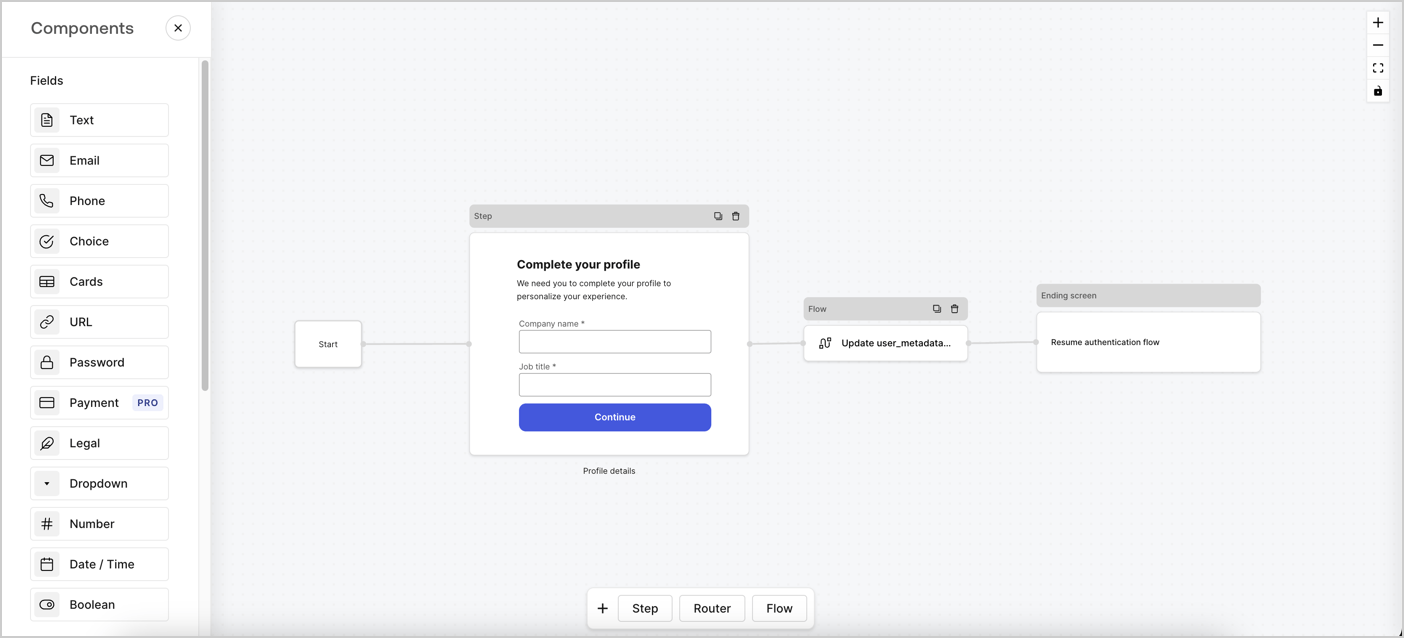
Forms for Actions allows you to create progressive profiling flows to decide when to prompt users to collect missing information, such as company name and job title, and store them as `user_metadata` attributes.
<Frame>
  <img src="https://mintcdn.com/docs-dev-fix-docs-5547-passwordless-db-update/xcuxGOpvWoMzT0Sa/docs/images/cdy7uua7fh8z/xUx9YmnHvnAqL19JvNtNP/60dae88f893d4ebe8e3523421e960596/Progressive-profle-overview.png?fit=max&auto=format&n=xcuxGOpvWoMzT0Sa&q=85&s=df9a65811f957422a00d3544a18ebb68" alt="Dashboard > Actions > Forms > Form" data-og-width="1404" width="1404" data-og-height="638" height="638" data-path="docs/images/cdy7uua7fh8z/xUx9YmnHvnAqL19JvNtNP/60dae88f893d4ebe8e3523421e960596/Progressive-profle-overview.png" data-optimize="true" data-opv="3" srcset="https://mintcdn.com/docs-dev-fix-docs-5547-passwordless-db-update/xcuxGOpvWoMzT0Sa/docs/images/cdy7uua7fh8z/xUx9YmnHvnAqL19JvNtNP/60dae88f893d4ebe8e3523421e960596/Progressive-profle-overview.png?w=280&fit=max&auto=format&n=xcuxGOpvWoMzT0Sa&q=85&s=994a974a9d5a1763011f9700323b6ca7 280w, https://mintcdn.com/docs-dev-fix-docs-5547-passwordless-db-update/xcuxGOpvWoMzT0Sa/docs/images/cdy7uua7fh8z/xUx9YmnHvnAqL19JvNtNP/60dae88f893d4ebe8e3523421e960596/Progressive-profle-overview.png?w=560&fit=max&auto=format&n=xcuxGOpvWoMzT0Sa&q=85&s=27aae896c6773a9af788b0150dad2616 560w, https://mintcdn.com/docs-dev-fix-docs-5547-passwordless-db-update/xcuxGOpvWoMzT0Sa/docs/images/cdy7uua7fh8z/xUx9YmnHvnAqL19JvNtNP/60dae88f893d4ebe8e3523421e960596/Progressive-profle-overview.png?w=840&fit=max&auto=format&n=xcuxGOpvWoMzT0Sa&q=85&s=e7ebbd3b149f841dd1441abfe96c4b96 840w, https://mintcdn.com/docs-dev-fix-docs-5547-passwordless-db-update/xcuxGOpvWoMzT0Sa/docs/images/cdy7uua7fh8z/xUx9YmnHvnAqL19JvNtNP/60dae88f893d4ebe8e3523421e960596/Progressive-profle-overview.png?w=1100&fit=max&auto=format&n=xcuxGOpvWoMzT0Sa&q=85&s=ab275473717b148feefeec0cab389172 1100w, https://mintcdn.com/docs-dev-fix-docs-5547-passwordless-db-update/xcuxGOpvWoMzT0Sa/docs/images/cdy7uua7fh8z/xUx9YmnHvnAqL19JvNtNP/60dae88f893d4ebe8e3523421e960596/Progressive-profle-overview.png?w=1650&fit=max&auto=format&n=xcuxGOpvWoMzT0Sa&q=85&s=8b872aa5bcbdadb7e0c497a7444be7bf 1650w, https://mintcdn.com/docs-dev-fix-docs-5547-passwordless-db-update/xcuxGOpvWoMzT0Sa/docs/images/cdy7uua7fh8z/xUx9YmnHvnAqL19JvNtNP/60dae88f893d4ebe8e3523421e960596/Progressive-profle-overview.png?w=2500&fit=max&auto=format&n=xcuxGOpvWoMzT0Sa&q=85&s=f92fdf328abb455199b792f88ccaa173 2500w" />
</Frame>

The sections below outline how you can create a progressive profile form using nodes and flows, along with steps for adding your form to a [Post Login Action](/docs/customize/actions/explore-triggers/signup-and-login-triggers/login-trigger).

## Create a form from scratch

Follow these steps to create a form to gather information:

1. Open the Form editor by selecting **Auth0 Dashboard > Actions > Forms.**
2. Select **Create Form** > **Start from scratch**.

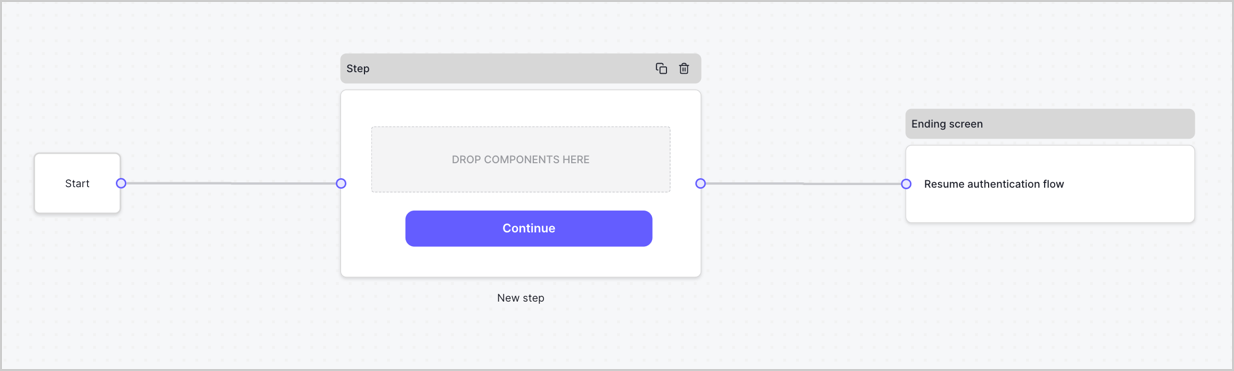
By default, a new form contains a Start node, a Step node, and an Ending screen node.
<Frame>
  <img src="https://mintcdn.com/docs-dev-fix-docs-5547-passwordless-db-update/PVS4YYaDfznGvCp4/docs/images/cdy7uua7fh8z/2TZ9jSjgEcARFpULI6hz4R/a4319a1bd482f2ee5cc23100fdb2f42c/New-form-Forms-for-action-use-case.png?fit=max&auto=format&n=PVS4YYaDfznGvCp4&q=85&s=a065c9d9f10e43946e47f0b92584822b" alt="Dashboard > Forms > Use Cases > Form" data-og-width="1234" width="1234" data-og-height="371" height="371" data-path="docs/images/cdy7uua7fh8z/2TZ9jSjgEcARFpULI6hz4R/a4319a1bd482f2ee5cc23100fdb2f42c/New-form-Forms-for-action-use-case.png" data-optimize="true" data-opv="3" srcset="https://mintcdn.com/docs-dev-fix-docs-5547-passwordless-db-update/PVS4YYaDfznGvCp4/docs/images/cdy7uua7fh8z/2TZ9jSjgEcARFpULI6hz4R/a4319a1bd482f2ee5cc23100fdb2f42c/New-form-Forms-for-action-use-case.png?w=280&fit=max&auto=format&n=PVS4YYaDfznGvCp4&q=85&s=5edef8562d0a64d72aceb9dc89688a91 280w, https://mintcdn.com/docs-dev-fix-docs-5547-passwordless-db-update/PVS4YYaDfznGvCp4/docs/images/cdy7uua7fh8z/2TZ9jSjgEcARFpULI6hz4R/a4319a1bd482f2ee5cc23100fdb2f42c/New-form-Forms-for-action-use-case.png?w=560&fit=max&auto=format&n=PVS4YYaDfznGvCp4&q=85&s=e4fac777a2f06a32769d44fcf0f4d638 560w, https://mintcdn.com/docs-dev-fix-docs-5547-passwordless-db-update/PVS4YYaDfznGvCp4/docs/images/cdy7uua7fh8z/2TZ9jSjgEcARFpULI6hz4R/a4319a1bd482f2ee5cc23100fdb2f42c/New-form-Forms-for-action-use-case.png?w=840&fit=max&auto=format&n=PVS4YYaDfznGvCp4&q=85&s=5dbcc3f048fc41a3f1e4b91e9f3ca53f 840w, https://mintcdn.com/docs-dev-fix-docs-5547-passwordless-db-update/PVS4YYaDfznGvCp4/docs/images/cdy7uua7fh8z/2TZ9jSjgEcARFpULI6hz4R/a4319a1bd482f2ee5cc23100fdb2f42c/New-form-Forms-for-action-use-case.png?w=1100&fit=max&auto=format&n=PVS4YYaDfznGvCp4&q=85&s=d059fcf91809a6307d9b55cd2a435252 1100w, https://mintcdn.com/docs-dev-fix-docs-5547-passwordless-db-update/PVS4YYaDfznGvCp4/docs/images/cdy7uua7fh8z/2TZ9jSjgEcARFpULI6hz4R/a4319a1bd482f2ee5cc23100fdb2f42c/New-form-Forms-for-action-use-case.png?w=1650&fit=max&auto=format&n=PVS4YYaDfznGvCp4&q=85&s=cbcbf670424b28894fcc57d42c7aada1 1650w, https://mintcdn.com/docs-dev-fix-docs-5547-passwordless-db-update/PVS4YYaDfznGvCp4/docs/images/cdy7uua7fh8z/2TZ9jSjgEcARFpULI6hz4R/a4319a1bd482f2ee5cc23100fdb2f42c/New-form-Forms-for-action-use-case.png?w=2500&fit=max&auto=format&n=PVS4YYaDfznGvCp4&q=85&s=9872efc688696c922ec9a6bb69c6890e 2500w" />
</Frame>

### Configure the Step node

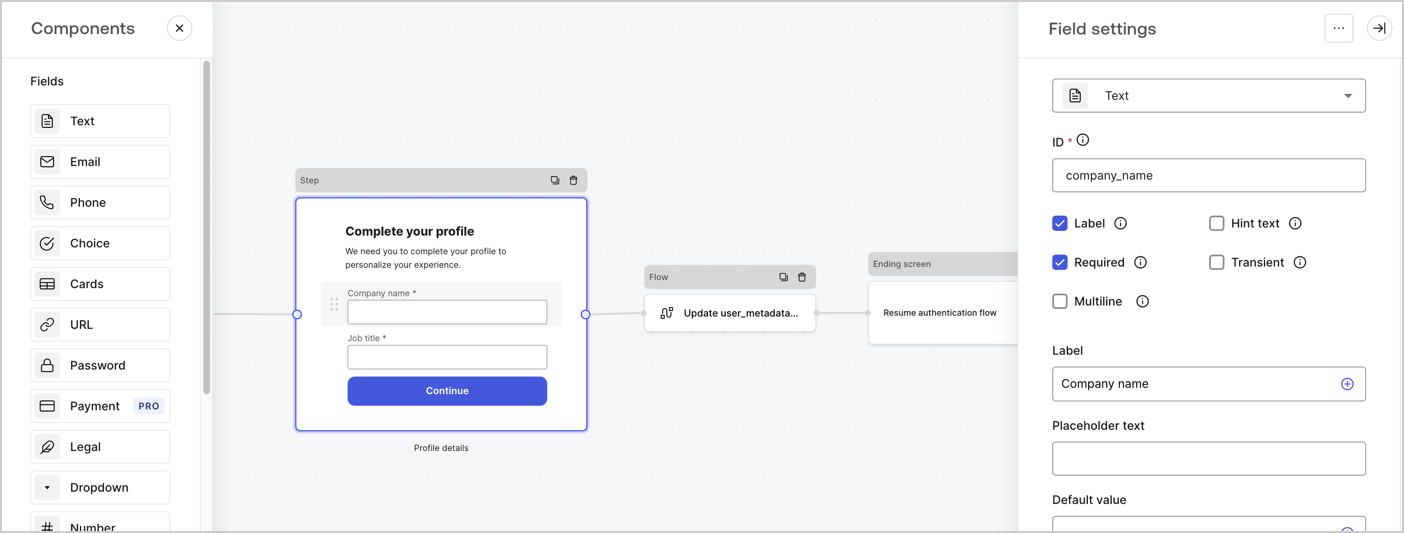
The Step node is the graphical interface visible to users. Add [Fields](/docs/customize/forms/nodes-and-components) to the Step node to collect the user's company name and job title values by following these steps:

1. Drag a **Rich text** field from the **Components menu** into the **Step** node.

   * **Rich text**: Enter a custom message.

     * **Example**: `Complete your profile! We need you to complete your profile to personalize your experience.`
   * Select **Save**.
2. Drag a **Text** field into the **Step** node.

   * **ID**: Enter `company_name`.
   * **Label**: Enable the checkbox.
   * **Label**: Enter `Company name`.
   * **Required**: Enable the checkbox.
   * Select **Save**.
3. Drag a **Text** field into the **Step** node.

   1. **ID**: Enter `job_title`.
   2. **Label**: Enter `Job title`.
   3. **Label**: Enable the checkbox.
   4. **Required**: Enable the checkbox.
   5. Select **Save**.
4. Select **Publish** to save.
<Frame>
  <img src="https://mintcdn.com/docs-dev-fix-docs-5547-passwordless-db-update/Lfu7vN1oaL2INCAz/docs/images/cdy7uua7fh8z/6H1lRzwKyYioQyQJ9MtIoM/aa248e92fc028a68a5b92ff361a11644/progressive-profile-step.png?fit=max&auto=format&n=Lfu7vN1oaL2INCAz&q=85&s=843fe66b2113a696095205553210f20e" alt="Dashboard > Actions > Forms > Form > Step node" data-og-width="1404" width="1404" data-og-height="533" height="533" data-path="docs/images/cdy7uua7fh8z/6H1lRzwKyYioQyQJ9MtIoM/aa248e92fc028a68a5b92ff361a11644/progressive-profile-step.png" data-optimize="true" data-opv="3" srcset="https://mintcdn.com/docs-dev-fix-docs-5547-passwordless-db-update/Lfu7vN1oaL2INCAz/docs/images/cdy7uua7fh8z/6H1lRzwKyYioQyQJ9MtIoM/aa248e92fc028a68a5b92ff361a11644/progressive-profile-step.png?w=280&fit=max&auto=format&n=Lfu7vN1oaL2INCAz&q=85&s=080922f93709750ec5970127e984cfd8 280w, https://mintcdn.com/docs-dev-fix-docs-5547-passwordless-db-update/Lfu7vN1oaL2INCAz/docs/images/cdy7uua7fh8z/6H1lRzwKyYioQyQJ9MtIoM/aa248e92fc028a68a5b92ff361a11644/progressive-profile-step.png?w=560&fit=max&auto=format&n=Lfu7vN1oaL2INCAz&q=85&s=52be835031cf16387b8eb50f017f9dc7 560w, https://mintcdn.com/docs-dev-fix-docs-5547-passwordless-db-update/Lfu7vN1oaL2INCAz/docs/images/cdy7uua7fh8z/6H1lRzwKyYioQyQJ9MtIoM/aa248e92fc028a68a5b92ff361a11644/progressive-profile-step.png?w=840&fit=max&auto=format&n=Lfu7vN1oaL2INCAz&q=85&s=45f9ed20af4bb7109a55a11730540948 840w, https://mintcdn.com/docs-dev-fix-docs-5547-passwordless-db-update/Lfu7vN1oaL2INCAz/docs/images/cdy7uua7fh8z/6H1lRzwKyYioQyQJ9MtIoM/aa248e92fc028a68a5b92ff361a11644/progressive-profile-step.png?w=1100&fit=max&auto=format&n=Lfu7vN1oaL2INCAz&q=85&s=9a2cba5ff77076d5cac9b4b6376635c6 1100w, https://mintcdn.com/docs-dev-fix-docs-5547-passwordless-db-update/Lfu7vN1oaL2INCAz/docs/images/cdy7uua7fh8z/6H1lRzwKyYioQyQJ9MtIoM/aa248e92fc028a68a5b92ff361a11644/progressive-profile-step.png?w=1650&fit=max&auto=format&n=Lfu7vN1oaL2INCAz&q=85&s=ae59e8ff55124db6337c8825725a8cc3 1650w, https://mintcdn.com/docs-dev-fix-docs-5547-passwordless-db-update/Lfu7vN1oaL2INCAz/docs/images/cdy7uua7fh8z/6H1lRzwKyYioQyQJ9MtIoM/aa248e92fc028a68a5b92ff361a11644/progressive-profile-step.png?w=2500&fit=max&auto=format&n=Lfu7vN1oaL2INCAz&q=85&s=c24f583e639eb967efbea254315c25f5 2500w" />
</Frame>

### Configure the flow node

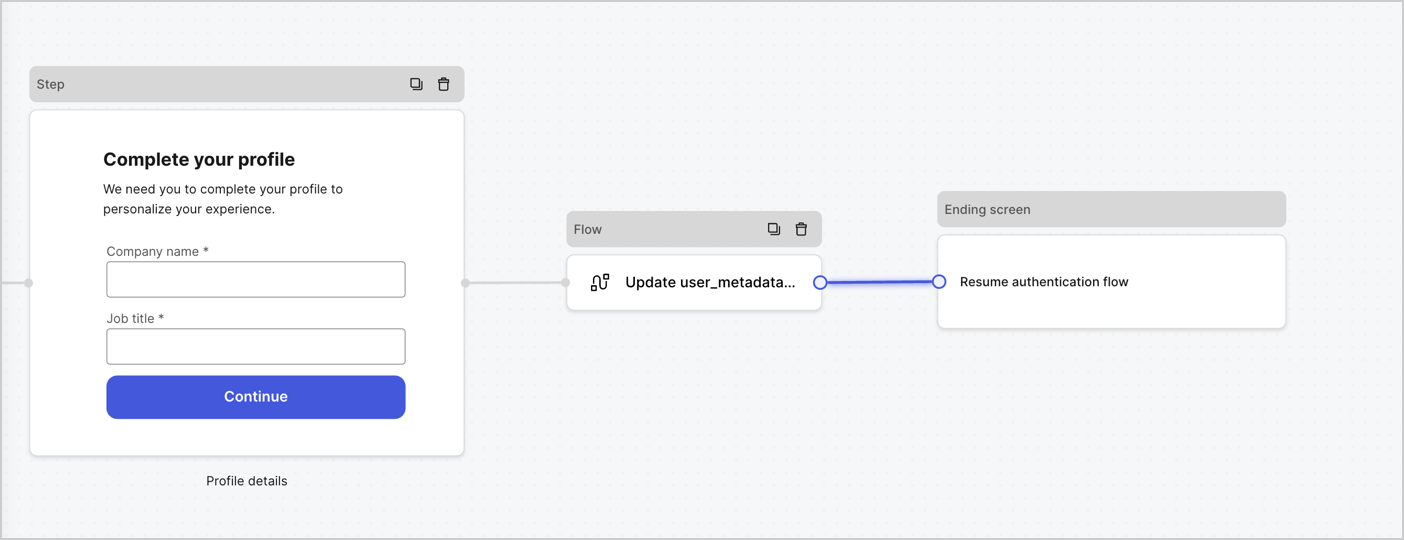
Add a **Flow** node after the **Step** node to update the `user_metadata` and resume the authentication flow by following these steps:

1. Select **Flow** from the bottom of the Form editor.
2. Remove the existing link between the **Step** and **Ending Screen** nodes.
3. Select the new **Flow** > **Click to add a flow** > **Create a new flow.**

   * Enter `Update user_metadata` in the **Name** field.
   * Select **Create**.
   * Select **Save**.
4. Link the **Flow** node to the **Step** and **Ending Screen** nodes as pictured below.
5. Select **Publish** to save.
<Frame>
  <img src="https://mintcdn.com/docs-dev-fix-docs-5547-passwordless-db-update/LGFE5GZUSti0B09h/docs/images/cdy7uua7fh8z/5C91DaWn4LGtJT9BF87ssu/095171d0c452a287c44bfde12fd6d13f/link-nodes.png?fit=max&auto=format&n=LGFE5GZUSti0B09h&q=85&s=1e81fb684af2327ada84e233afd1cb2e" alt="Dashboard > Actions > Forms > Form" data-og-width="1404" width="1404" data-og-height="540" height="540" data-path="docs/images/cdy7uua7fh8z/5C91DaWn4LGtJT9BF87ssu/095171d0c452a287c44bfde12fd6d13f/link-nodes.png" data-optimize="true" data-opv="3" srcset="https://mintcdn.com/docs-dev-fix-docs-5547-passwordless-db-update/LGFE5GZUSti0B09h/docs/images/cdy7uua7fh8z/5C91DaWn4LGtJT9BF87ssu/095171d0c452a287c44bfde12fd6d13f/link-nodes.png?w=280&fit=max&auto=format&n=LGFE5GZUSti0B09h&q=85&s=ebfa41f54bb39c055a4503c46518f512 280w, https://mintcdn.com/docs-dev-fix-docs-5547-passwordless-db-update/LGFE5GZUSti0B09h/docs/images/cdy7uua7fh8z/5C91DaWn4LGtJT9BF87ssu/095171d0c452a287c44bfde12fd6d13f/link-nodes.png?w=560&fit=max&auto=format&n=LGFE5GZUSti0B09h&q=85&s=1802da0f1259cf37880d13768ed4fb6d 560w, https://mintcdn.com/docs-dev-fix-docs-5547-passwordless-db-update/LGFE5GZUSti0B09h/docs/images/cdy7uua7fh8z/5C91DaWn4LGtJT9BF87ssu/095171d0c452a287c44bfde12fd6d13f/link-nodes.png?w=840&fit=max&auto=format&n=LGFE5GZUSti0B09h&q=85&s=38e6db503ffd1c39732134b2e637a195 840w, https://mintcdn.com/docs-dev-fix-docs-5547-passwordless-db-update/LGFE5GZUSti0B09h/docs/images/cdy7uua7fh8z/5C91DaWn4LGtJT9BF87ssu/095171d0c452a287c44bfde12fd6d13f/link-nodes.png?w=1100&fit=max&auto=format&n=LGFE5GZUSti0B09h&q=85&s=fbb60ac65f043a0a4dc285522559e308 1100w, https://mintcdn.com/docs-dev-fix-docs-5547-passwordless-db-update/LGFE5GZUSti0B09h/docs/images/cdy7uua7fh8z/5C91DaWn4LGtJT9BF87ssu/095171d0c452a287c44bfde12fd6d13f/link-nodes.png?w=1650&fit=max&auto=format&n=LGFE5GZUSti0B09h&q=85&s=b7cbbb416919402a276136674252d83f 1650w, https://mintcdn.com/docs-dev-fix-docs-5547-passwordless-db-update/LGFE5GZUSti0B09h/docs/images/cdy7uua7fh8z/5C91DaWn4LGtJT9BF87ssu/095171d0c452a287c44bfde12fd6d13f/link-nodes.png?w=2500&fit=max&auto=format&n=LGFE5GZUSti0B09h&q=85&s=a6e7adc55365bad26e4acb31aab92a02 2500w" />
</Frame>

Add an Auth0 Update user action to the flow by following these steps:

1. Select the **Update user\_metadata** flow, then select the **Edit Flow** to open the Flow editor in a new tab.
2. Below the **Start** action, select the **+** icon to add an **Update user** action. Complete the fields below, then select **Save** to continue.

   * **Connection**: Select from the dropdown the Vault connection to your M2M application.

   * **User ID**: Enter `{{context.user.user_id}}`.

   * **Body**: Copy and paste the following code to update the user\_metadata with `job_title` and `company_name` properties.

     ```json lines theme={null}
     {
        "user_metadata": {
           "job_title": "{{fields.job_title}}",
           "company_name": "{{fields.company_name}}"
        }
     }
     ```

   * Select **Save**.
3. Select **Publish** to save.

<Frame>
  <img src="https://mintcdn.com/docs-dev-fix-docs-5547-passwordless-db-update/SRedKsF8LPj4Uf7S/docs/images/cdy7uua7fh8z/65Jx4W5oIZJyyvA8z4HqIx/0661b1a8ca6361c54fc4fef07ba59f0b/update-user.png?fit=max&auto=format&n=SRedKsF8LPj4Uf7S&q=85&s=f3b4c2b882d6fc8480315037a55dd135" alt="Dashboard > Actions > Forms > Flows" data-og-width="1404" width="1404" data-og-height="244" height="244" data-path="docs/images/cdy7uua7fh8z/65Jx4W5oIZJyyvA8z4HqIx/0661b1a8ca6361c54fc4fef07ba59f0b/update-user.png" data-optimize="true" data-opv="3" srcset="https://mintcdn.com/docs-dev-fix-docs-5547-passwordless-db-update/SRedKsF8LPj4Uf7S/docs/images/cdy7uua7fh8z/65Jx4W5oIZJyyvA8z4HqIx/0661b1a8ca6361c54fc4fef07ba59f0b/update-user.png?w=280&fit=max&auto=format&n=SRedKsF8LPj4Uf7S&q=85&s=3d329fa7cae1539c6e1b42c11b5241cb 280w, https://mintcdn.com/docs-dev-fix-docs-5547-passwordless-db-update/SRedKsF8LPj4Uf7S/docs/images/cdy7uua7fh8z/65Jx4W5oIZJyyvA8z4HqIx/0661b1a8ca6361c54fc4fef07ba59f0b/update-user.png?w=560&fit=max&auto=format&n=SRedKsF8LPj4Uf7S&q=85&s=20088f48fddba4c0ac369758449518a8 560w, https://mintcdn.com/docs-dev-fix-docs-5547-passwordless-db-update/SRedKsF8LPj4Uf7S/docs/images/cdy7uua7fh8z/65Jx4W5oIZJyyvA8z4HqIx/0661b1a8ca6361c54fc4fef07ba59f0b/update-user.png?w=840&fit=max&auto=format&n=SRedKsF8LPj4Uf7S&q=85&s=79cb990bd500e7ec7648e7a573dc7be3 840w, https://mintcdn.com/docs-dev-fix-docs-5547-passwordless-db-update/SRedKsF8LPj4Uf7S/docs/images/cdy7uua7fh8z/65Jx4W5oIZJyyvA8z4HqIx/0661b1a8ca6361c54fc4fef07ba59f0b/update-user.png?w=1100&fit=max&auto=format&n=SRedKsF8LPj4Uf7S&q=85&s=ae03d540c530995d226bbcd904227060 1100w, https://mintcdn.com/docs-dev-fix-docs-5547-passwordless-db-update/SRedKsF8LPj4Uf7S/docs/images/cdy7uua7fh8z/65Jx4W5oIZJyyvA8z4HqIx/0661b1a8ca6361c54fc4fef07ba59f0b/update-user.png?w=1650&fit=max&auto=format&n=SRedKsF8LPj4Uf7S&q=85&s=851fd232455fc114855b47a0b395d742 1650w, https://mintcdn.com/docs-dev-fix-docs-5547-passwordless-db-update/SRedKsF8LPj4Uf7S/docs/images/cdy7uua7fh8z/65Jx4W5oIZJyyvA8z4HqIx/0661b1a8ca6361c54fc4fef07ba59f0b/update-user.png?w=2500&fit=max&auto=format&n=SRedKsF8LPj4Uf7S&q=85&s=1e5c1a63e3f7a359030a07873b2b7d7b 2500w" />
</Frame>

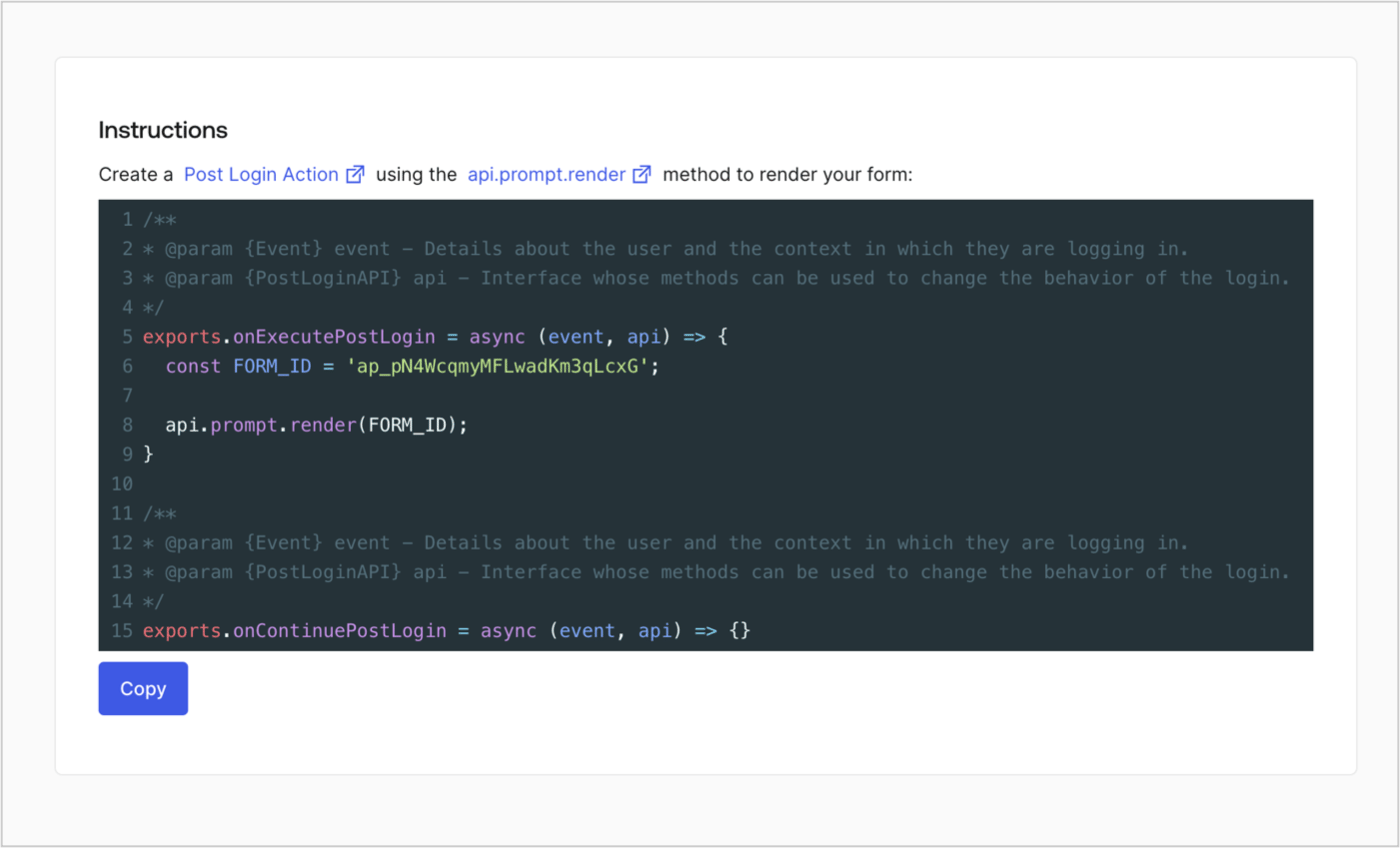
### Retrieve the form render code

Retrieve the form render code to visually render the form with a custom Post Login Action by following these steps:

* From the Form editor, select **`<> Render`**.
* Select **Copy**.
<Frame>
  <img src="https://mintcdn.com/docs-dev-fix-docs-5547-passwordless-db-update/RI5PzOB_XKDAkIrK/docs/images/cdy7uua7fh8z/2EIUzc539sq9lwoTKbjoJv/496a864c0fc44a782c9cadca119dbfb0/embed.png?fit=max&auto=format&n=RI5PzOB_XKDAkIrK&q=85&s=d089bf95e3a39ff6e95428b919bfedc1" alt="Dashboard > Actions > Forms > Form > Embed" data-og-width="1400" width="1400" data-og-height="848" height="848" data-path="docs/images/cdy7uua7fh8z/2EIUzc539sq9lwoTKbjoJv/496a864c0fc44a782c9cadca119dbfb0/embed.png" data-optimize="true" data-opv="3" srcset="https://mintcdn.com/docs-dev-fix-docs-5547-passwordless-db-update/RI5PzOB_XKDAkIrK/docs/images/cdy7uua7fh8z/2EIUzc539sq9lwoTKbjoJv/496a864c0fc44a782c9cadca119dbfb0/embed.png?w=280&fit=max&auto=format&n=RI5PzOB_XKDAkIrK&q=85&s=b1e054a1312f4bed580c17956e43fa4f 280w, https://mintcdn.com/docs-dev-fix-docs-5547-passwordless-db-update/RI5PzOB_XKDAkIrK/docs/images/cdy7uua7fh8z/2EIUzc539sq9lwoTKbjoJv/496a864c0fc44a782c9cadca119dbfb0/embed.png?w=560&fit=max&auto=format&n=RI5PzOB_XKDAkIrK&q=85&s=2a5de5f3e4f1da0145d89bdeb189757d 560w, https://mintcdn.com/docs-dev-fix-docs-5547-passwordless-db-update/RI5PzOB_XKDAkIrK/docs/images/cdy7uua7fh8z/2EIUzc539sq9lwoTKbjoJv/496a864c0fc44a782c9cadca119dbfb0/embed.png?w=840&fit=max&auto=format&n=RI5PzOB_XKDAkIrK&q=85&s=6e1582a46ad374d8583c32a1f1b16d24 840w, https://mintcdn.com/docs-dev-fix-docs-5547-passwordless-db-update/RI5PzOB_XKDAkIrK/docs/images/cdy7uua7fh8z/2EIUzc539sq9lwoTKbjoJv/496a864c0fc44a782c9cadca119dbfb0/embed.png?w=1100&fit=max&auto=format&n=RI5PzOB_XKDAkIrK&q=85&s=69321743960b934240c8641bded7005e 1100w, https://mintcdn.com/docs-dev-fix-docs-5547-passwordless-db-update/RI5PzOB_XKDAkIrK/docs/images/cdy7uua7fh8z/2EIUzc539sq9lwoTKbjoJv/496a864c0fc44a782c9cadca119dbfb0/embed.png?w=1650&fit=max&auto=format&n=RI5PzOB_XKDAkIrK&q=85&s=d7c663b66fc94456691a30b8588a433a 1650w, https://mintcdn.com/docs-dev-fix-docs-5547-passwordless-db-update/RI5PzOB_XKDAkIrK/docs/images/cdy7uua7fh8z/2EIUzc539sq9lwoTKbjoJv/496a864c0fc44a782c9cadca119dbfb0/embed.png?w=2500&fit=max&auto=format&n=RI5PzOB_XKDAkIrK&q=85&s=dcb70e60a005abe723346c5a62aab2d3 2500w" />
</Frame>

## Create a Post Login Action

Create a post-login Action to render your form by following these steps:

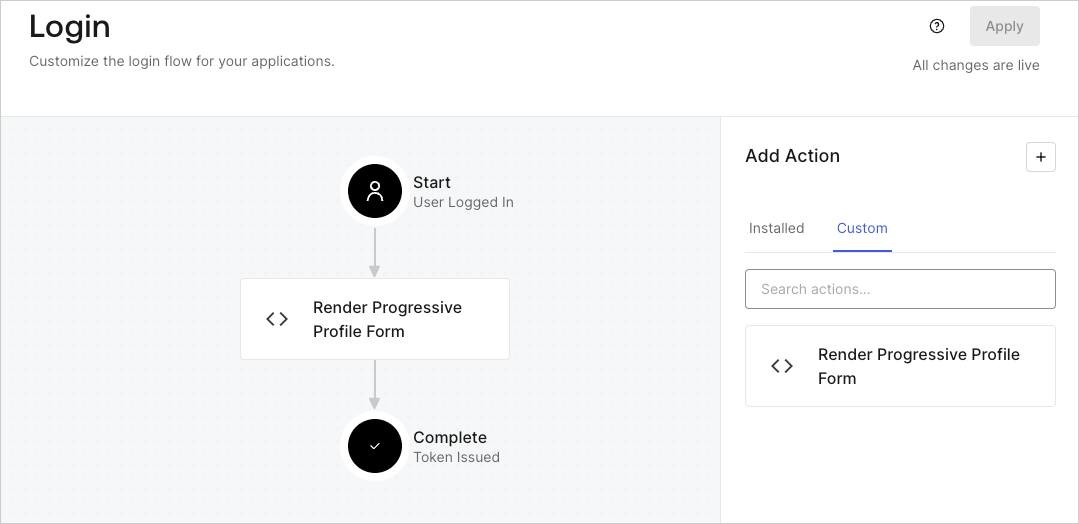
1. Navigate to **Auth0 Dashboard > Actions > Flows > Login.**
2. Select the **+** icon and select **Build from scratch**:

   * **Name**: Enter `Render Progressive Profile Form`.
   * **Trigger**: Select `Login / Post Login`.
   * **Runtime**: Select the recommended version.
3. Select **Create**.

To configure the post-login Action:

1. Delete the existing code from the Code editor.
2. Paste the form embed code into the Code editor.
3. Edit the code to define the conditional logic that will render the form.

   ```javascript lines theme={null}
   /**
   * @param {Event} event - Details about the user and the context in which they are logging in.
   * @param {PostLoginAPI} api - Interface whose methods can be used to change the behavior of the login.
   */
   exports.onExecutePostLogin = async (event, api) => {
     const FORM_ID = 'REPLACE_WITH_YOUR_FORM_ID';

     if (
       event.stats.logins_count > 2 &&
       !event.user.user_metadata.company_name &&
       !event.user.user_metadata.job_title
     ) {
       api.prompt.render(FORM_ID);
     }
   }

   exports.onContinuePostLogin = async (event, api) => { }
   ```

   <Callout icon="file-lines" color="#0EA5E9" iconType="regular">
     The example code above will render the form when a user has a login count > 2 and is missing the user metadata company\_name and job\_title properties.
   </Callout>
4. Select **Deploy.**
5. Drag and Drop the **Render Progressive Profile Form** Action to the **Login** flow.
   <Frame>
     <img src="https://mintcdn.com/docs-dev-fix-docs-5547-passwordless-db-update/t06xjsmMhAHLypy6/docs/images/cdy7uua7fh8z/1QjjZdpTqTxx012UDN4xk9/99fba5ef4068a5688f1762eea7f42976/renderprogessiveprofile.png?fit=max&auto=format&n=t06xjsmMhAHLypy6&q=85&s=8efbec1a19e7dfeba8f04b18a23ecdcc" alt="Dashboard > Forms > Use Cases Progressive Profile Login Action" data-og-width="1079" width="1079" data-og-height="524" height="524" data-path="docs/images/cdy7uua7fh8z/1QjjZdpTqTxx012UDN4xk9/99fba5ef4068a5688f1762eea7f42976/renderprogessiveprofile.png" data-optimize="true" data-opv="3" srcset="https://mintcdn.com/docs-dev-fix-docs-5547-passwordless-db-update/t06xjsmMhAHLypy6/docs/images/cdy7uua7fh8z/1QjjZdpTqTxx012UDN4xk9/99fba5ef4068a5688f1762eea7f42976/renderprogessiveprofile.png?w=280&fit=max&auto=format&n=t06xjsmMhAHLypy6&q=85&s=eccfa791f7d06762a487b89d8b68f88a 280w, https://mintcdn.com/docs-dev-fix-docs-5547-passwordless-db-update/t06xjsmMhAHLypy6/docs/images/cdy7uua7fh8z/1QjjZdpTqTxx012UDN4xk9/99fba5ef4068a5688f1762eea7f42976/renderprogessiveprofile.png?w=560&fit=max&auto=format&n=t06xjsmMhAHLypy6&q=85&s=3ac6ed1494ad411d9e3dbe3ff0cf4c00 560w, https://mintcdn.com/docs-dev-fix-docs-5547-passwordless-db-update/t06xjsmMhAHLypy6/docs/images/cdy7uua7fh8z/1QjjZdpTqTxx012UDN4xk9/99fba5ef4068a5688f1762eea7f42976/renderprogessiveprofile.png?w=840&fit=max&auto=format&n=t06xjsmMhAHLypy6&q=85&s=647d7c093eebda511770e655c8c4c658 840w, https://mintcdn.com/docs-dev-fix-docs-5547-passwordless-db-update/t06xjsmMhAHLypy6/docs/images/cdy7uua7fh8z/1QjjZdpTqTxx012UDN4xk9/99fba5ef4068a5688f1762eea7f42976/renderprogessiveprofile.png?w=1100&fit=max&auto=format&n=t06xjsmMhAHLypy6&q=85&s=209b5f51fc06a584b19cfcaecab62038 1100w, https://mintcdn.com/docs-dev-fix-docs-5547-passwordless-db-update/t06xjsmMhAHLypy6/docs/images/cdy7uua7fh8z/1QjjZdpTqTxx012UDN4xk9/99fba5ef4068a5688f1762eea7f42976/renderprogessiveprofile.png?w=1650&fit=max&auto=format&n=t06xjsmMhAHLypy6&q=85&s=d1ebed0e75fe340614c408308604f167 1650w, https://mintcdn.com/docs-dev-fix-docs-5547-passwordless-db-update/t06xjsmMhAHLypy6/docs/images/cdy7uua7fh8z/1QjjZdpTqTxx012UDN4xk9/99fba5ef4068a5688f1762eea7f42976/renderprogessiveprofile.png?w=2500&fit=max&auto=format&n=t06xjsmMhAHLypy6&q=85&s=9ca071f0eae6e8f142c8f0057b688dee 2500w" />
   </Frame>
6. Select **Apply**.

### Test implementation

Test the implementation by following these steps:

1. Log in with an existing user whose login count is greater than 2 and their `user_metadata` attributes `company_name` and `job_title` have no values.
2. The post-login action in the Login flow will render the form and prompt for the information.
3. Select **Auth0 Dashboard > User Management > Users,** locate the user and verify that the `user_metadata` attributes `company_name` and `job_title` contain information.
